PolyMax™ PETG: Next-Level Toughness and Versatility
Engineered for demanding applications, PolyMax™ PETG outperforms standard PETG filaments with exceptional mechanical strength and resilience.
Superior Toughness and Impact Resistance
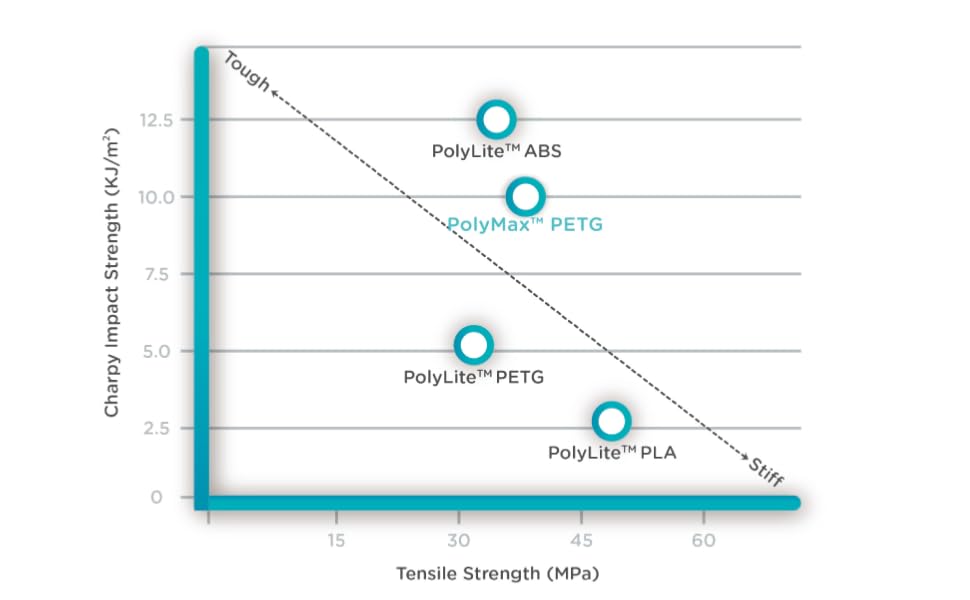
Building on PETG’s renowned chemical resistance, PolyMax™ PETG delivers significantly greater fracture toughness than PolyLite™ PETG. Its advanced formulation ensures enhanced ductility and outstanding impact resistance for parts that need to withstand real-world stress.
Innovative Modified PETG Blend
PolyMax™ PETG combines the best of PETG and PCTG, offering high strength and rigidity while maintaining improved flexibility and resilience. This unique balance makes it ideal for both functional prototypes and end-use parts that demand durability and reliability.
Choose PolyMax™ PETG when your project requires the ultimate in toughness—without compromising printability or performance.
When it prints well it's a nice material, but I have gotten layer shifting issues like no other filament I've used before - probably wasted 1-2 rolls of 5 just because of reprints. I also had one which was tangled and, to Polymaker's credit, was refunded for. Overall OK, but I really wish they'd provide a print profile for the MK4s which was tested and validated so I didn't have to deal with this.
i love this product so much, it works like a charm with my X1C, not like that pcs of #$#% of overture petg that i got last week
I have printed with a lot of filament and Polymaker never disappoints. I have printed a lot of their PETG on my Bambu Lab printer with no issues.
This is an easy to print PETG. No stringing or mess like done other brands. Fits and works perfectly inside the bambu x1c AMS module, too
Have a x1c, used the settings called out and prints well enough.
I'm a huge preacher of Atomic Filament but I can't always wait for their delivery times. I decided to give this Polymaker PETG a try since Hatchbox and Overture PETG had its drawbacks, and this stuff prints fantastically. Very accurate and it looks great. Minimal stringing and so far no cracks from the things I am putting together (larger sized ball and crescent joints) that the other mentioned brands had.I'll definitely be trying their other filaments and colors.
Not much to say here ... PolyMaker makes some superb PETG. I bought another brand prior to this and struggled and struggled to get a good print without being stringy. This PolyMaker PETG printed fantastic without any tweaking of the standard PETG settings in my slicer.
Solid PETG
I do not write reviews often but in the case of this filament, absolutely. I have always used Hatchbox for my PETG needs, but no longer. The filament was shipped in the normal brown Poly box but vacuum sealed in a non-reusable bag. That is ok with me because I knew when I opened the package, the hiss let me know it was sealed correctly. As always, dry out your filament, especially PETG. I let this run at 54c for 8 hours before using. This is not my first translucent filament but it has been the EASIEST to print with. Stringing is basically non-existent, adhesion is not a factor and the quality of the prints are immaculate. I have tried countless filaments over the years from all manufacturers. Poly is my go to PLA using PLA Pro or Polylite because I have never had one issue with their filaments, so why not try their PETG. Yes this comes in a cardboard roll which I am fine with.Right now I am printing this with heavy infill because I need the strength but the transparency is VERY good even with 40% infill. Printing with a larger nozzle, less infill, thicker walls, and post-processing will give you a clearer finish. Print this slower than PLA. You can also go down to .1 and REALLY slow printing for a very clear finish, but will lose strength and time printing.PETG can be a little tricky if you do not have the correct temps / retractions. Surprisingly, I print this at a lower temp than other PETG filaments. I am running a Titan Direct Drive so my retraction settings will differ from a Bowden setup. I have printed this with Marlin without issue and currently running Klipper with BETTER results.Setup: Creality CR10-v3 STOCKBed: G10When printing on Glass I raise 5cCura Settings for a stronger PETG print (Currently using settings for fan ducts for Hero Me G7).4 brass nozzle.2 layer height.4 line width1.2 wall thickness2 Top Surface Skin LayersMonotonic Top/Bottom UncheckedSkin in Z Gaps UncheckedIroning Unchecked40% infillConnect Infill Lines UncheckedTemp 235Build Plate 80Initial Layer Bottom Flow 108%Print Speed 40mm/sMy Titan Extruder Retraction settingsEnable RetractionRetract at Layer change CheckedRetraction Distance .8Retraction Speed 45mm/sRetract before outer wall CheckedLimit Support Retractions UncheckedEnable Print cooling UNCHECKED <----------With Klipper, turn off all Acceleration Control, Jerk Control, Z Hop when retracted. Take your time with the Klipper setup and go through each step in order, not skipping. If you walked through all Klipper settings, everything will print GREAT. If not, blame the user and not the tools. I skipped a couple the first time through and was so confused as to why everyone loved Klipper because my results were terrible. Impatience got me. I went through the setup again (took my time, couple days), and I am sold. I will not go back to Marlin.For a good print, everyone should make sure a couple of things are in order regardless of slicer, firmware or printer...1. Your bed is level2. No seriously, take the time and level your damn bed3. Do not write bad reviews because filaments do not stick to your unlevel bed4. ESTEPS. Tune them, per roll, not per filament. It can change from roll to roll. Also, tune your ESTEPS at the temperature you are going to print at (start a spreadsheet and keep track of settings to cut down on the time it takes when changing rolls).5. Correct temperatures. This can also change PER ROLL and depending on how dry it is. If you hear a slight pop sound, too much moisture.6. Bed adhesion. I have used Carborundum glass beds, thick mirrors, HomeDepot 12in mirrors and now G10. There is ONE common factor to all of them, do not touch the bed. EVER. Wash the bed with dish soap and water, then dry with a clean, lint free cloth. Glass beds would require me to clean them every few prints. G10, pfft. I just wipe it down with the blue shop roll paper towels and done. Now if I TOUCH the bed, I clean it with dish soap and water. You can also use 99.99% alcohol to wipe the beds down as well. Spend $20 and get a G10 sheet. You will not be sorry.Happy Printing!
Printing Temperature: 230˚C - 260˚C
Bed Temperature: 70˚C - 80˚C
Printing Speed: 30mm/s - 50mm/s
Fan: 20%
Direct Drive:
Retraction Distance: 1mm
Retraction Speed: 20mm/s
Indirect Drive:
Retraction Distance: 3mm
Retraction Speed: 40mm/s
Drying Settings: 65˚C for 6h
(Only if the material has absorbed moisture)
Can't find the profile you are looking for? Join our very active Discord where thousands of members may have already made the profile you need.
What is the difference between PCTG and PolyMax™ PETG?
A little bit of Material Science first:
PET is made from terephthalic acid ('TPA') and ethylene glycol ('EG') (CH2OH)2
PCT is made from terephthalic acid ('TPA') and cyclohexanedimethanol (‘CHDM’) C6H10(CH2OH)2
If you react TPA with both EG and CHDM, you get a co-polymer, called PETg or PCTg.
Usually the polymer is called PETg when the major diol is ethylene glycol (>50%) and PCTg when the major diol is CHDM (>50%).
The higher the EG content the stronger and more rigid the material, the higher the CHDM content the more ductile and impact resistant the material.
In summary:
PETG -> Strong and rigid
PCTG -> Ductile and impact resistant
Our PolyMax™ PETG is a modified PETG with enhanced fracture toughness which makes it more ductile and impact resistance.
To conclude, PolyMax™ PETG provides the best of both PETG and PCTG with high strength and rigidity as well as enhanced ductility and impact resistance.
Do I need to use the cooling fan with PolyMax™ PETG?
If you are looking to produce the strongest part (high layer adhesion), we recommend to switch off your part cooling fan.
If you are looking for a high quality surface finish, we recommend to switch on your part cooling fan.
Usually the best of both worlds is to leave the part cooling fan at 20%.
Will the spools work in an AMS?
Yes! We have redesigned the edges of our spools so all Polymaker products will now spin great in the AMS.
Is this material food safe?
Unfortunately we do not have any data whether this material is food safe. As of now, no 3D printing material on the market is FDA food safe compliant. This is because in order to be certified as food safe, the actual object needs to be certified and not the base material. The shape, bed used, environment the object was made, and much more goes into getting a food safety certificate. As of now there is no real certification that the FDA offers for 3D printing.
Do you sell refills?
We are sorry but we do not sell refills at this time
Printing Requirements
None! Will print great on any stock FDM 3D printer without any upgrades required.
If using a stock, older style printer - we would recommend printing slower.
REACH | RoHS | 889 | PCP | ISO9001 CERT | PROP65WARNING
Payment & Security
Payment methods
Your payment information is processed securely. We do not store credit card details nor have access to your credit card information.
Product Information & Downloads


When it prints well it's a nice material, but I have gotten layer shifting issues like no other filament I've used before - probably wasted 1-2 rolls of 5 just because of reprints. I also had one which was tangled and, to Polymaker's credit, was refunded for. Overall OK, but I really wish they'd provide a print profile for the MK4s which was tested and validated so I didn't have to deal with this.
i love this product so much, it works like a charm with my X1C, not like that pcs of #$#% of overture petg that i got last week
I have printed with a lot of filament and Polymaker never disappoints. I have printed a lot of their PETG on my Bambu Lab printer with no issues.
This is an easy to print PETG. No stringing or mess like done other brands. Fits and works perfectly inside the bambu x1c AMS module, too
Have a x1c, used the settings called out and prints well enough.
I'm a huge preacher of Atomic Filament but I can't always wait for their delivery times. I decided to give this Polymaker PETG a try since Hatchbox and Overture PETG had its drawbacks, and this stuff prints fantastically. Very accurate and it looks great. Minimal stringing and so far no cracks from the things I am putting together (larger sized ball and crescent joints) that the other mentioned brands had.I'll definitely be trying their other filaments and colors.
Not much to say here ... PolyMaker makes some superb PETG. I bought another brand prior to this and struggled and struggled to get a good print without being stringy. This PolyMaker PETG printed fantastic without any tweaking of the standard PETG settings in my slicer.
Solid PETG
I do not write reviews often but in the case of this filament, absolutely. I have always used Hatchbox for my PETG needs, but no longer. The filament was shipped in the normal brown Poly box but vacuum sealed in a non-reusable bag. That is ok with me because I knew when I opened the package, the hiss let me know it was sealed correctly. As always, dry out your filament, especially PETG. I let this run at 54c for 8 hours before using. This is not my first translucent filament but it has been the EASIEST to print with. Stringing is basically non-existent, adhesion is not a factor and the quality of the prints are immaculate. I have tried countless filaments over the years from all manufacturers. Poly is my go to PLA using PLA Pro or Polylite because I have never had one issue with their filaments, so why not try their PETG. Yes this comes in a cardboard roll which I am fine with.Right now I am printing this with heavy infill because I need the strength but the transparency is VERY good even with 40% infill. Printing with a larger nozzle, less infill, thicker walls, and post-processing will give you a clearer finish. Print this slower than PLA. You can also go down to .1 and REALLY slow printing for a very clear finish, but will lose strength and time printing.PETG can be a little tricky if you do not have the correct temps / retractions. Surprisingly, I print this at a lower temp than other PETG filaments. I am running a Titan Direct Drive so my retraction settings will differ from a Bowden setup. I have printed this with Marlin without issue and currently running Klipper with BETTER results.Setup: Creality CR10-v3 STOCKBed: G10When printing on Glass I raise 5cCura Settings for a stronger PETG print (Currently using settings for fan ducts for Hero Me G7).4 brass nozzle.2 layer height.4 line width1.2 wall thickness2 Top Surface Skin LayersMonotonic Top/Bottom UncheckedSkin in Z Gaps UncheckedIroning Unchecked40% infillConnect Infill Lines UncheckedTemp 235Build Plate 80Initial Layer Bottom Flow 108%Print Speed 40mm/sMy Titan Extruder Retraction settingsEnable RetractionRetract at Layer change CheckedRetraction Distance .8Retraction Speed 45mm/sRetract before outer wall CheckedLimit Support Retractions UncheckedEnable Print cooling UNCHECKED <----------With Klipper, turn off all Acceleration Control, Jerk Control, Z Hop when retracted. Take your time with the Klipper setup and go through each step in order, not skipping. If you walked through all Klipper settings, everything will print GREAT. If not, blame the user and not the tools. I skipped a couple the first time through and was so confused as to why everyone loved Klipper because my results were terrible. Impatience got me. I went through the setup again (took my time, couple days), and I am sold. I will not go back to Marlin.For a good print, everyone should make sure a couple of things are in order regardless of slicer, firmware or printer...1. Your bed is level2. No seriously, take the time and level your damn bed3. Do not write bad reviews because filaments do not stick to your unlevel bed4. ESTEPS. Tune them, per roll, not per filament. It can change from roll to roll. Also, tune your ESTEPS at the temperature you are going to print at (start a spreadsheet and keep track of settings to cut down on the time it takes when changing rolls).5. Correct temperatures. This can also change PER ROLL and depending on how dry it is. If you hear a slight pop sound, too much moisture.6. Bed adhesion. I have used Carborundum glass beds, thick mirrors, HomeDepot 12in mirrors and now G10. There is ONE common factor to all of them, do not touch the bed. EVER. Wash the bed with dish soap and water, then dry with a clean, lint free cloth. Glass beds would require me to clean them every few prints. G10, pfft. I just wipe it down with the blue shop roll paper towels and done. Now if I TOUCH the bed, I clean it with dish soap and water. You can also use 99.99% alcohol to wipe the beds down as well. Spend $20 and get a G10 sheet. You will not be sorry.Happy Printing!
Canada
Global